
By Professional IT Services | Orlando, FL
A new kind of AI tool has small business owners buzzing — and IT security experts losing sleep. You may have seen it on social media under several names: it launched in late 2025 as Clawdbot, briefly became Moltbot in January 2026, and is now officially called OpenClaw. Whatever you call it, the pitch is the same. This is an AI assistant that doesn’t just chat — it actually does things on your computer.
Here’s what every small business owner should know before jumping in.
What OpenClaw Actually Does
Built by Austrian developer Peter Steinberger, OpenClaw is a free, open-source AI agent that runs on your own hardware. Unlike ChatGPT or Claude, which mostly produce text on screen, OpenClaw plugs into the apps you already use — WhatsApp, Telegram, Slack, Discord — and uses them to take real actions. Send it a chat message and it can schedule a calendar entry, summarize a long email thread, draft a follow-up to a lead, research a prospect on the web, or reorganize the files on your desktop.
It’s powered by a large language model such as Anthropic’s Claude. The software itself costs nothing; you only pay for the LLM API usage, which typically runs $20 to $50 per month for a small business workload.
“It’s the AI that actually does things” — not just one that talks about doing them.
Why Small Businesses Are Paying Attention
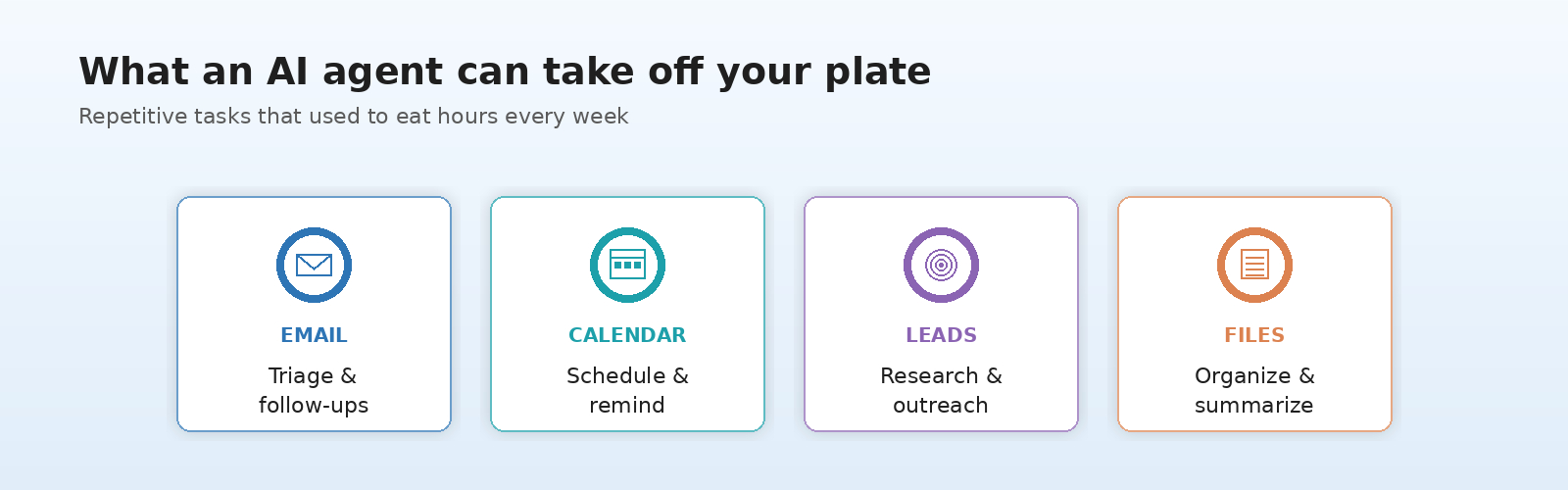
For a one- or two-person shop, the appeal is obvious. The repetitive tasks that eat your week — chasing invoices, qualifying new leads, triaging your inbox, prepping client follow-ups — are exactly what OpenClaw was built to handle. Early adopters have used it for prospect research, lead-list building, simple CRM updates, and after-hours customer email triage.
Two things make it especially attractive compared to traditional automation platforms like Zapier or Make.com. First, there’s no monthly SaaS subscription beyond the LLM cost. Second — and this matters a lot for businesses with confidential client data — the agent runs locally on your machine. Your customer information doesn’t have to live in a third-party cloud platform.
For a freelancer, accountant, real estate agent, or consultant juggling dozens of small recurring tasks, that combination of “always on, no recurring fee, runs on my hardware” is a real productivity story.
The Security Elephant in the Room

Here’s where small business owners need to slow down. To be useful, OpenClaw needs deep access — your email, calendar, files, browser, and often your saved passwords. That same access is what makes it dangerous when something goes wrong.
The risks aren’t theoretical. Cybersecurity firm Kaspersky has labeled OpenClaw one of the biggest insider threats of 2026. A critical vulnerability discovered earlier this year (CVE-2026-25253, scored 8.8 out of 10) allowed attackers to run arbitrary commands on a compromised installation. By default, the software stores API keys and credentials in plain text, and known information-stealing malware has already been updated to target OpenClaw configuration files specifically. The agent is also extended by community-uploaded “skills,” and within the first weeks of its release, hundreds of malicious skills were uploaded to its public repository.
OpenClaw is also vulnerable to prompt injection attacks — a technique where hidden instructions in a webpage or email can hijack the agent and make it do something its owner never asked for. The Chinese government has gone so far as restricting state agencies and banks from running it.
For a Fortune 500 company with a security team, those risks can be managed. For a five-person business with no dedicated IT staff, it’s a different conversation.
What This Means for Your Business
The right move for most small businesses is not to ignore tools like OpenClaw — that train has left the station. The right move is to evaluate them with adult supervision. Before you install any AI agent that touches your business data:
- Audit exactly what the agent will be allowed to access, and turn off everything it doesn’t strictly need.
- Use a separate machine — or a virtual one — instead of installing it on the computer that runs your accounting software.
- Keep credentials in a real password manager, not in plain-text config files.
- Decide in advance which tasks an AI agent may complete autonomously and which require human review before sending.
Tools like OpenClaw are part of a much bigger shift toward AI agents that take action rather than just generate text. That shift is going to accelerate. The businesses that will benefit are the ones that adopt deliberately, with the right guardrails, rather than reactively.

If you’d like a hand evaluating whether an AI agent makes sense for your business, deciding which tasks it can safely handle, or simply locking down your current setup before you start tinkering, that’s exactly what Professional IT Services helps Orlando small businesses with every day. Reach out and let’s talk before something goes sideways — not after.




Leave A Comment